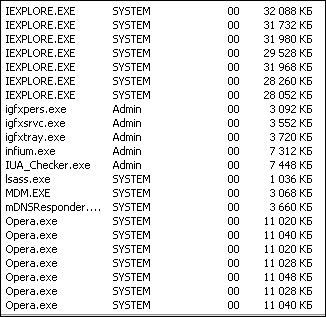
Із прикрістю дізнався, що віднедавна з Opera Mini на мобільному телефоні я не зможу відповісти на коментар, додати фото або іншу інформацію. Портал почав боротьбу з так званими "анонімайзерами". До числа цих серверів потрапили й сервіси opera.com. Таким чином, із Opera Mini, а також із Opera Mobile та Opera за умови підключення функції Opera Turbo стало неможливим повноцінно користуватися порталом. Такі кроки адміністрації зачеплять тих, хто користується повільним і дорогим мобільним інтернетом і хоче при цьому заощадити свій час та гроші. :(
Более поздняя... Opera 9.52 Build 10107 RC1 обычная с инсталляцией.
Ссылки на версию 10107 в обычном и портативном вариантах не прямые, к сожалению забрать вы их можете только с этого сайта... при переходе по этим ссылкам кликать кнопки скачать бесплатно.Портативная для работы с флеш не требует установки естественно... обе в релизе.
Описания изменений в этих версиях...
Копипаст так с аглицким не дружу исключая терминологию Explore our newest features
• Quick Find. Have you ever
forgotten the page where you found that great article or that perfect
gift? When using Opera the browser remembers not only the titles and
addresses, but the actual content of the Web pages you visit.
•
Opera Link. Access your favorite Web sites everywhere! Opera Link syncs
your bookmarks and Speed Dial between your computers and mobile phone.
•
New browser engine. We've made the fastest browser in the world even
faster with superior support for Web standards. Opera 9.5 is quicker to
start, faster at loading Web pages and better at running your favorite
Web applications.
° More than 2x faster than Opera 9.2 in rendering JavaScript and HTML
° Faster handling of third party plug-ins
° Much faster start up time
° Superior support for Web standards
Master your information
• Tabs and Sessions. Opera is very
light on your computer, so it’s possible to have many tabs open at
once. Drag and drop tabs around to change their order, or get a preview
pausing over them with your mouse. You can even save a session of tabs
for later, making it easy to pick up where you left off.
• Content
blocking. Block images, pop-ups, and plug-ins you don't want .
Right-click and choose “Block content” to selectively disable annoying
elements. To make Web pages load faster, or to avoid offensive content,
temporarily turn off images by pressing the image button. In Opera,
smart pop-up blocking is turned on by default.
• Zoom and Fit to
width. Is it difficult to read the content on a page? Use Opera’s Zoom
button in the lower right corner to resize Web pages. If the page is
too wide for your screen, simply hit “Fit to Width” and Opera will
resize the Web page so you avoid horizontal scrolling.
• Built-in
e-mail and newsfeeds. Opera's built-in e-mail client features improved
responsiveness. It also retrieves and searches your mail and news feeds
even faster than before. In Opera, newsfeeds are stored on your
computer so you can read them later, even when you're offline. Easily
tag articles so you know which ones you want to read, which ones are
important, which ones are funny, etc.
Changelog:
* Fixed problem where some Windows users would get a "Engine Init() Failed" error message on startup.
* Fixed a problem with M&T Bank.
* Fixed a problem with file uploads from Windows network locations.
* Fixed an issue with importing POP accounts from 9.2x.
* Fixed a small memory leak in the BitTorrent code.
* Fixed image uploading to Flickr.
* Added bookmark path to autocompleted bookmarks in the address bar to better distinguish them from visited pages.
* Disabled APOP authentication at online.no by default (not supported by them).
* Fixed a crash that could occur when opening mail notification popups on a secondary monitor.
* Fixed a few icon/skin issues.
* Added a "Close Tab" entry to the File menu on Windows and Linux.
* Fixed some translation errors.
По видимому устав наблюдать за бесконечными браузерными войнами, разработчики популярных пакетов для тестирования системы выпустили еще один.
Peacekeeper оценивает скорость браузера. Прогнав с его помощью всю “великолепную
пятерку” (Firefox, Chrome, Safari, Opera, IE) можно узнать какой из них работает быстрее всего на Вашем ПК. Тесты основаны на измерении скорости выполнения наиболее распространенных Javascript, отобранных после анализа сайтов YouTube, Facebook, GMail и Meebo.
[ Читать дальше ]
Где хранятся просмотренные флеш-ролики FLV и прослушанные вами файлы MP3? - И как их сохранить в свою библиотеку роликов или музыки? - этот вопрос часто задают себе юзеры совершая серфинг по инетернет пространству. По умолчанию все они хранятся в временной папке (в кеше, на жёстком диске вашего компьютера). Пути в кеш, разные для разных броузеров. Так, для броузера "Explouer" 6 и "Опера" 9.5 они находятся:
Для броузера "Explouer" 6
C:\Documents and Settings\USER*\Local Settings\Temporary Internet Files
Для броузера "Опера" 9.5
C:\Documents and Settings\USER*\Local Settings\Application Data\Opera\Opera\profile\cache4
Для того чтобы системная папка была видна, не забудьте включить опции - "показывать расширения для зарегичтрированных файлов" и "показывать системные папки",
"Мой компьютер" в меню СЕРВИС / Cвойства папки...
-----------------------------------------------------------------------------------------------------------------
Внимание! Это всё, только под Windows XP!(Vista, увы, не рулит...)
-----------------------------------------------------------------------------------------------------------------
При этом, для броузера "Опера" 9.5 файлы видео *.flv и аудио *.mp3 ложатся, после прослушивания или просмотра, в следующую папочку, где USER* - имя вашего профиля в ХP: C:\Documents and Settings\USER*\Local Settings\Application Data\Opera\Opera\profile\cache4
Файлы отыскиваете сортируя по размеру или поступлению. Копируете на рабочий стол (потому как для кеша "Опера" они не имеют родного расширения файла, в отличии от броузера "Explouer") и сначала прописываете расширение (проверяете методом просмотра или прослушивания в родной програмке), а потом переименовываете само имя файла, и уже после сохраняете себе в колекцию.
Там же в кеше, хранятся и другие просмотренные файлы, с расширениями: FLV, AVI, JPG, MP3, DOC ит.д.
...Недавно оновили - дуже гарне оновлення) Завантаження прискорилось, а що найбільше сподобалось - можливість зробити скріншот + одразу його відредагувати ...Обов'язково спробуйте!
Opera - очень быстрый и нетребовательный к ресурсам системы и к тому же ищё и бесплатный браузер с собственным ядром. Имеет встроенный менеджер закачек.
Opera отличается малыми размерами, скоростью загрузки HTML документов, универсальностью в загрузке и отображении веб-страниц, богатством настроек и абсолютной функциональностью. Благодаря многообразию своих настроек, Opera может помочь вам сберечь драгоценное онлайновое время и работать с вашим компьютером наиболее эффективно, то есть использовать Opera как профессиональный броузер, управляя выводом графических изображений, использованием каскадных таблиц стилей и интерфейсом.
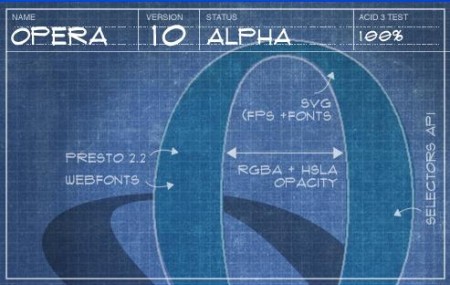
Состоялся долгожданный первый выпуск популярнейшего веб-браузера Opera 10. Все желающие могут ознакомиться с первым тестовым выпуском программы.
В новой версии произведено множество разнообразных улучшений движка. Эта версия на 100% проходит популярный комплекс тестов браузеров на совместимость с веб-стандартами Acid3. Отмечу основные улучшения: улучшенная обработка CSS, новый движок регулярных выражений, поддержка веб-шрифтов и SVG, поддержка цветовых моделей RGBA и HSLA, поддержка Selectors API, улучшенная печать XML без стилей (для такого случая используется предустановленный стиль). Также разработчиком отмечается аж 30-ти процентный прирост в скорости при работе с тяжелыми сайтами типа Gmail и Facebook.
Особого внимания достойна и система автоматического обновления программы. Opera 10 поддерживает как обновление до последнего финального выпуска, так и до каждой новой тестовой сборки.
В 10-й версии введена и долгожданная проверка орфографии при печати в веб-формах. Образованная программа сообщит пользователю, если тот в спешке допустил ошибку. Русский язык поддерживается.
Обновление не обошло стороной и почтовый клиент, входящий в состав Opera. В приложении значительно расширены возможности по форматированию текста и разнообразному оформлению писем. Также теперь Opera Mail умеет удалять залежавшуюся корреспонденцию с сервера через определенное время.
Остается добавить, что по мере приближению к финальному выпуску, разработчики намерены внести еще немало полезных улучшений и дополнительных функций в программу.
Opera — это популярнейший браузер от разработчиков из холодной Норвегии. Имеет собственное, весьма шустрое ядро, благодаря которому способен очень быстро обрабатывать страницы. По сравнению с Internet Explorer, Опера работает гораздо быстрее. Более того, разработчики называют свой браузер самым быстрым в мире, что возможно и спорно, но очень даже близко к истине.
На данный момент версия 10 - пока является альфой поэтому, для пользователей предпочитающих стабильные версии в которых они могут быть уверенны выкладываю ссылку на версию билда 9.63 ну и конечно же тем кто не боится тестировать новое ПО на "десяточку" ссылки прямые.




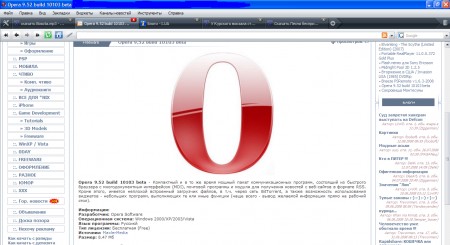
 Explore our newest features
• Quick Find. Have you ever
forgotten the page where you found that great article or that perfect
gift? When using Opera the browser remembers not only the titles and
addresses, but the actual content of the Web pages you visit.
•
Opera Link. Access your favorite Web sites everywhere! Opera Link syncs
your bookmarks and Speed Dial between your computers and mobile phone.
•
New browser engine. We've made the fastest browser in the world even
faster with superior support for Web standards. Opera 9.5 is quicker to
start, faster at loading Web pages and better at running your favorite
Web applications.
° More than 2x faster than Opera 9.2 in rendering JavaScript and HTML
° Faster handling of third party plug-ins
° Much faster start up time
° Superior support for Web standards
Master your information
• Tabs and Sessions. Opera is very
light on your computer, so it’s possible to have many tabs open at
once. Drag and drop tabs around to change their order, or get a preview
pausing over them with your mouse. You can even save a session of tabs
for later, making it easy to pick up where you left off.
• Content
blocking. Block images, pop-ups, and plug-ins you don't want .
Right-click and choose “Block content” to selectively disable annoying
elements. To make Web pages load faster, or to avoid offensive content,
temporarily turn off images by pressing the image button. In Opera,
smart pop-up blocking is turned on by default.
• Zoom and Fit to
width. Is it difficult to read the content on a page? Use Opera’s Zoom
button in the lower right corner to resize Web pages. If the page is
too wide for your screen, simply hit “Fit to Width” and Opera will
resize the Web page so you avoid horizontal scrolling.
• Built-in
e-mail and newsfeeds. Opera's built-in e-mail client features improved
responsiveness. It also retrieves and searches your mail and news feeds
even faster than before. In Opera, newsfeeds are stored on your
computer so you can read them later, even when you're offline. Easily
tag articles so you know which ones you want to read, which ones are
important, which ones are funny, etc.
Changelog:
* Fixed problem where some Windows users would get a "Engine Init() Failed" error message on startup.
* Fixed a problem with M&T Bank.
* Fixed a problem with file uploads from Windows network locations.
* Fixed an issue with importing POP accounts from 9.2x.
* Fixed a small memory leak in the BitTorrent code.
* Fixed image uploading to Flickr.
* Added bookmark path to autocompleted bookmarks in the address bar to better distinguish them from visited pages.
* Disabled APOP authentication at online.no by default (not supported by them).
* Fixed a crash that could occur when opening mail notification popups on a secondary monitor.
* Fixed a few icon/skin issues.
* Added a "Close Tab" entry to the File menu on Windows and Linux.
* Fixed some translation errors.
Explore our newest features
• Quick Find. Have you ever
forgotten the page where you found that great article or that perfect
gift? When using Opera the browser remembers not only the titles and
addresses, but the actual content of the Web pages you visit.
•
Opera Link. Access your favorite Web sites everywhere! Opera Link syncs
your bookmarks and Speed Dial between your computers and mobile phone.
•
New browser engine. We've made the fastest browser in the world even
faster with superior support for Web standards. Opera 9.5 is quicker to
start, faster at loading Web pages and better at running your favorite
Web applications.
° More than 2x faster than Opera 9.2 in rendering JavaScript and HTML
° Faster handling of third party plug-ins
° Much faster start up time
° Superior support for Web standards
Master your information
• Tabs and Sessions. Opera is very
light on your computer, so it’s possible to have many tabs open at
once. Drag and drop tabs around to change their order, or get a preview
pausing over them with your mouse. You can even save a session of tabs
for later, making it easy to pick up where you left off.
• Content
blocking. Block images, pop-ups, and plug-ins you don't want .
Right-click and choose “Block content” to selectively disable annoying
elements. To make Web pages load faster, or to avoid offensive content,
temporarily turn off images by pressing the image button. In Opera,
smart pop-up blocking is turned on by default.
• Zoom and Fit to
width. Is it difficult to read the content on a page? Use Opera’s Zoom
button in the lower right corner to resize Web pages. If the page is
too wide for your screen, simply hit “Fit to Width” and Opera will
resize the Web page so you avoid horizontal scrolling.
• Built-in
e-mail and newsfeeds. Opera's built-in e-mail client features improved
responsiveness. It also retrieves and searches your mail and news feeds
even faster than before. In Opera, newsfeeds are stored on your
computer so you can read them later, even when you're offline. Easily
tag articles so you know which ones you want to read, which ones are
important, which ones are funny, etc.
Changelog:
* Fixed problem where some Windows users would get a "Engine Init() Failed" error message on startup.
* Fixed a problem with M&T Bank.
* Fixed a problem with file uploads from Windows network locations.
* Fixed an issue with importing POP accounts from 9.2x.
* Fixed a small memory leak in the BitTorrent code.
* Fixed image uploading to Flickr.
* Added bookmark path to autocompleted bookmarks in the address bar to better distinguish them from visited pages.
* Disabled APOP authentication at online.no by default (not supported by them).
* Fixed a crash that could occur when opening mail notification popups on a secondary monitor.
* Fixed a few icon/skin issues.
* Added a "Close Tab" entry to the File menu on Windows and Linux.
* Fixed some translation errors.





 ...Обов'язково спробуйте!